Get Started
Deploy DRAW at your institution
DRAW is designed for deployment in resource-constrained settings. No local GPU hardware is required — the client runs on a standard desktop workstation with Docker.
Requirements
To deploy DRAW at your institution, you will need:
1. A standard desktop workstation (64-bit processor, 2GB+ RAM, 10GB+ disk).
2. Docker installed on the client workstation.
3. A network connection to the DRAW API server.
4. Access to your hospital DICOM imaging system (via DICOM SCP or network directory polling).
5. JWT access and refresh tokens issued by the DRAW team.
No GPU hardware is required on-site. The DRAW client supports any modern desktop operating system that supports Docker Desktop. GPU resources are managed by the server on demand.
1. A standard desktop workstation (64-bit processor, 2GB+ RAM, 10GB+ disk).
2. Docker installed on the client workstation.
3. A network connection to the DRAW API server.
4. Access to your hospital DICOM imaging system (via DICOM SCP or network directory polling).
5. JWT access and refresh tokens issued by the DRAW team.
No GPU hardware is required on-site. The DRAW client supports any modern desktop operating system that supports Docker Desktop. GPU resources are managed by the server on demand.
Deploy the DRAW Client
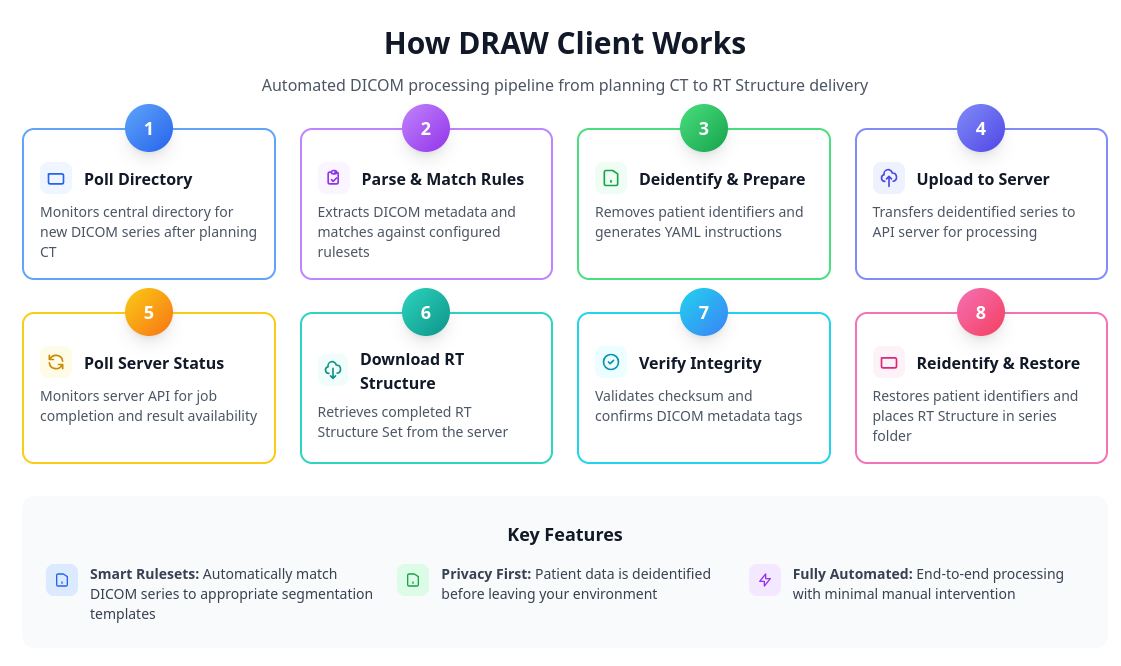
The DRAW client can be deployed on any modern desktop operating system using Docker. Minimum system requirements are a 64-bit processor, at least 2GB of available RAM, and more than 10 GB of available hard disk space. For DICOM-based workflows, sufficient additional disk space is required for handling DICOM files.
The client supports two mechanisms for receiving DICOM data: a DICOM SCP (C-Store Service Class Provider) for automatic receiving from imaging workstations, or a polling-based mechanism that watches a shared network directory for new files.
Configuration includes the DRAW API base URL, access and refresh tokens (JWT, stored encrypted), and a central directory for storing DICOM data. A custom CI pipeline automatically builds the client Docker images.
The client supports two mechanisms for receiving DICOM data: a DICOM SCP (C-Store Service Class Provider) for automatic receiving from imaging workstations, or a polling-based mechanism that watches a shared network directory for new files.
Configuration includes the DRAW API base URL, access and refresh tokens (JWT, stored encrypted), and a central directory for storing DICOM data. A custom CI pipeline automatically builds the client Docker images.
Custom Model Training
Hospitals can train and deploy custom segmentation models on their own patient data. DRAW supports site-specific configurations and structure definitions following the TG-263 standard.
New models can be trained within one week if a curated dataset is available, allowing centres to accommodate new target volume delineation protocols and guidelines. The DRAW client provides a "model mart" where users can pick and choose the models and structures they wish to be automatically segmented.
Contact the DRAW team to discuss custom model development.
New models can be trained within one week if a curated dataset is available, allowing centres to accommodate new target volume delineation protocols and guidelines. The DRAW client provides a "model mart" where users can pick and choose the models and structures they wish to be automatically segmented.
Contact the DRAW team to discuss custom model development.
Resources & Repositories
The DRAW project is open source. The following resources are available:
DRAW Server (API server + inference pipeline):
GitHub: CHAVI-India/draw
Zenodo DOI: 10.5281/zenodo.20388785
DRAW Client (client-side DICOM processing and de-identification):
Zenodo DOI: 10.5281/zenodo.19044374
COMET (COntour METrics) — open source tool for computing spatial overlap metrics:
Zenodo DOI: 10.5281/zenodo.19044314
DRAW website: https://draw.chavi.ai
CHAVI portal: https://chavi.ai
DRAW Server (API server + inference pipeline):
GitHub: CHAVI-India/draw
Zenodo DOI: 10.5281/zenodo.20388785
DRAW Client (client-side DICOM processing and de-identification):
Zenodo DOI: 10.5281/zenodo.19044374
COMET (COntour METrics) — open source tool for computing spatial overlap metrics:
Zenodo DOI: 10.5281/zenodo.19044314
DRAW website: https://draw.chavi.ai
CHAVI portal: https://chavi.ai
Register Your Interest
If your institution is interested in deploying DRAW, register your interest using the form below. Our team will follow up to discuss your clinical environment, infrastructure, and deployment options.
DRAW has been designed for deployment in resource-constrained settings and requires no local GPU hardware.